“How's it going?”
“Fine.”
Every parent knows that conversation. With Kid Startupper you do not have to rely on it — you can see exactly which lesson your child is on, what they have finished, and what comes next.
Every lesson has parts. Every part gets ticked off.
Your child marks each element complete as they finish it. Nothing is assumed — the progress you see is progress they confirmed.
Cycle 2 · Lesson 11
Building Your Business Model Canvas
Video lesson
Watched and marked complete
Reading — e-book chapter
Marked complete
Exercise — fill in your Canvas
Submitted on the platform
Quiz
Not started yet
Illustrative example of how a lesson appears once your child begins working through it.
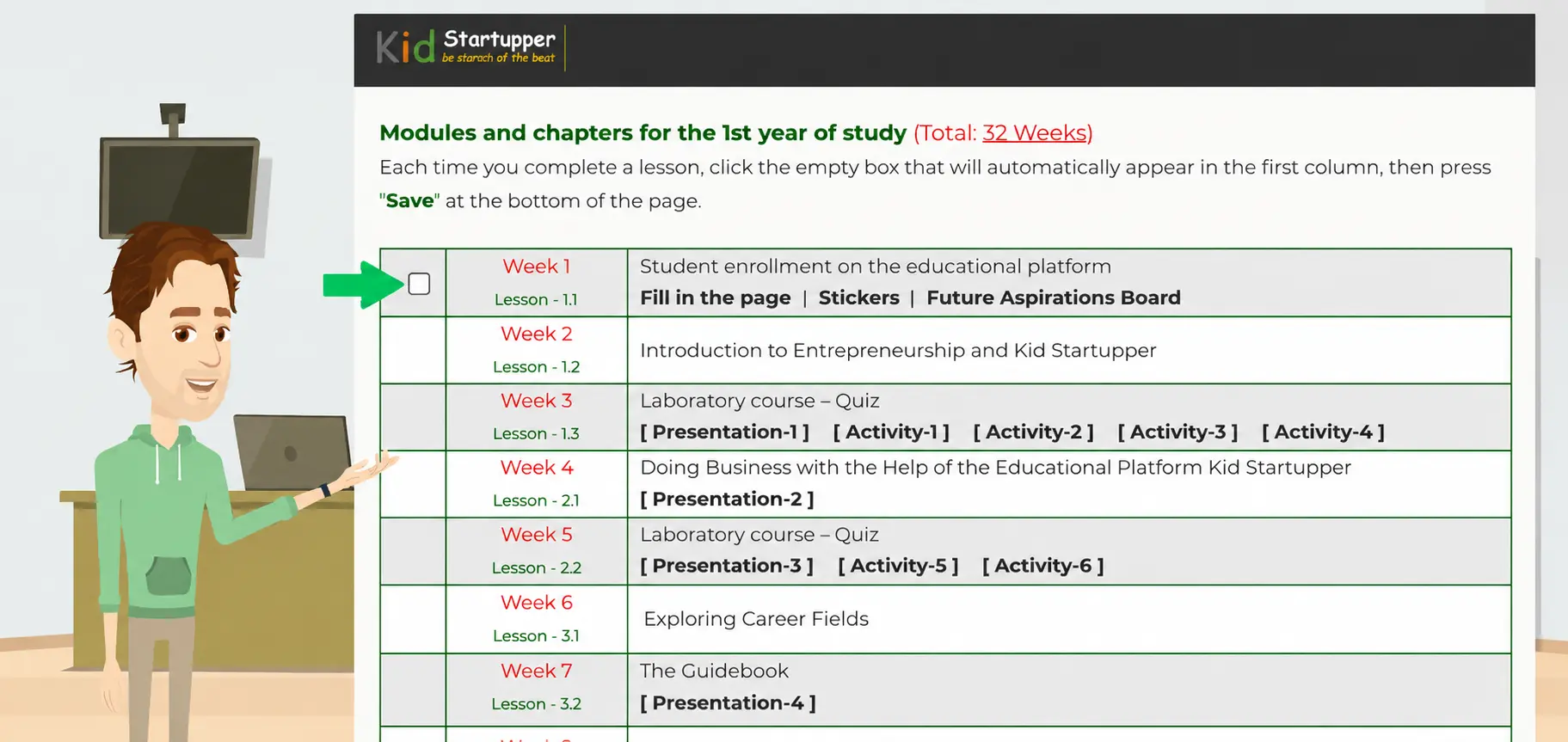
This is what it looks like on the platform
Lesson by lesson, cycle by cycle. No interpretation needed — either something is ticked, or it isn't.
Same structure, every single time
Your child works through all four, and confirms each one before the lesson counts as finished.
Watch the video
The lesson is introduced and explained, in language written for ages 10 to 15.
Read the chapter
The matching section of the e-book, covering the detail in their own time.
Do the exercise
Apply it to their own business inside the platform. This is where the building happens.
Take the quiz
Marked automatically. Confirms the lesson landed before moving on.
Six things you can see at any moment
No reports to request, no waiting for a term-end summary.
Exactly where they are
Which cycle, which lesson, and how far into it. If they tell you they are nearly finished, you can check.
What they have completed
Every video, reading, exercise and quiz they have marked done — and everything still outstanding.
Progress through the cycle
How many of the 22 lessons are finished, so you know whether they are on track for the year.
Quiz results
Marked automatically as they go. You see whether the material is landing, not just whether it was opened.
What they have built
Their profile, their business page, their Canvas. The actual work, not just a completion tick.
What comes next
The upcoming lesson and what it covers — so you can ask a specific question instead of a general one.
This tracks what they completed.
It does not track how hard they thought.
We could dress this up with words like “analytics” and “insights”, but here is what it actually is: a clear, honest record of what your child has worked through and what they have left.
It will not tell you whether they had a breakthrough on Tuesday, or whether the pricing chapter finally made sense. That part still comes from talking to them — and that is how it should be.
What it does do is remove the guessing. You never have to wonder whether “I did it” means they did it. You can look.
Who can see the progress
It depends on how your child joined the programme.
At home
- You supervise the account, as parental supervision is required for home learners
- Progress is visible in your child's account whenever you look together
- You see completed lessons, quiz results and everything they have built
- No reports to request and no waiting — it updates as they work
Through school
- The teacher sees progress for the whole class in real time
- The school administrator has a full dashboard across all students
- Teachers can spot who is falling behind before it becomes a problem
- Your child still has their own account and can show you at home
It changes the question you ask at dinner.
Instead of “how's the business thing going?” — which gets you “fine” — you can ask “how did the Business Model Canvas go? Did you work out who your customer is?”
That is a conversation. And it works because you spent ten seconds looking at what they had actually been doing.
What parents ask about tracking
Answered directly.
Your child confirms each part as they finish it — the video, the reading, the exercise and the quiz. The lesson only counts as complete once all parts are done. Nothing is marked automatically just because a page was opened.
In principle yes — and we would rather say so than pretend otherwise. But the exercises and quizzes are where the checking happens: the exercise requires actual work submitted on the platform, and the quiz is marked automatically. A child who skipped ahead will show it there quickly.
Progress lives inside the platform and updates as your child works, so you can check it whenever you want. We do not send automated progress emails — if that would be useful for your family, tell us, because feature requests from parents are how a good part of the platform got built.
No. At home your child works at their own pace within the cycle, which runs up to twelve months. Some do a lesson a week, others do three in a burst and then pause. Access continues through holidays and there is no penalty for taking longer.
No. Each cycle must be completed before the next one opens. The curriculum builds on itself deliberately — Cycle 3 assumes the business created in Cycle 2 exists, and Cycle 2 assumes the identity work from Cycle 1 is done.
Yes — and this is the part most parents find more interesting than the percentages. Their business page, their Business Model Canvas, their profile: all of it lives in the account and can be looked at directly. The completion ticks tell you where they are; the work tells you what they are doing.
Their progress is saved exactly where they left it. If they come back a month later, everything completed is still marked and they pick up at the next lesson. Nothing is lost and nothing needs repeating.
You will know. Not guess.
Every lesson, every exercise, every quiz — ticked off as your child works through it. Start the free trial and see the tracking from the first lesson.
No credit card · GDPR & COPPA compliant · Cancel any time · Or ask us a question first
What are they working through? See the full curriculum →
Who helps when they get stuck? Meet Andrew, the AI companion →
What happens when they finish? See the certificate →
Safety and privacy questions? Read our safety page →